Monday, May 24, 2010

Sheppard Software


While looking for some more educational games sites for my class, I was happy to find Sheppard Software, and their great collection of free educational online games. With games that cover Math, Language, Geography and History, and difficulty levels that span from preschool to college level, you can be sure that you will find something here that will appeal to your students. Many games are even free for teachers to download and use for school, homeschooling and tutoring. It has been CNN's site of the week, and may just prove to be a new favorite for you too.

Virtual Manipulatives (again)

I saw this on The Whiteboard Blog, and really liked it, so I felt compelled to post it here too! This Math


Manipulative tool is great for interactive whiteboards or LCD projectors as a teaching tool for Math. Select from a variety of commonly used manipulatives like base ten blocks, scales, geoboards, and more. The sheer versatility of this tool means that teachers of all age groups could benefit from using this online tool while teaching Math. No longer do you need wonder about where all the tens blocks went, or worry about whether or not you have all the right pieces for your tangram puzzles, (if anyone really knows that anyway).


--------------------------------------------------------------------------------

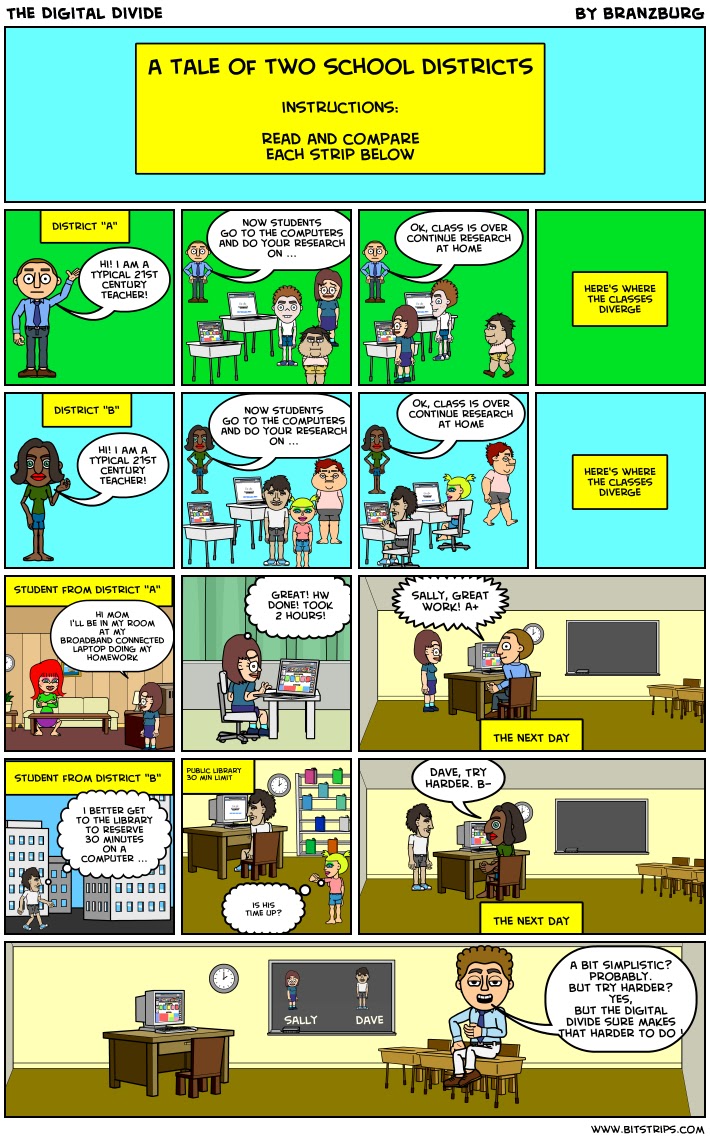
Digital Divide - Where Are Your Students?

Mobl21 for iTouches and Classroom Learning

I will be able to create some example content for my students, but more importantly, give them a chance to publish content themselves. There are a few steps required before you are published, here is an outline.


Firstly, download the free Mobl21 App and install on your iPod touch. You can’t do much with it until you have created a Mobl21 account and some content. There is some terminology to learn to understand how the content hierarchy is structured. At the top level you create a category, which is the largest unit in the course. I have called my first category ‘IT Alive’, the name of the elective this project is contained in. Within this category, I create a series of stacks, which are the different topics included in the elective.


Each stack has a studyguide, like an online book with substantial amount of textual content supported by media files such as image, audio, and video. With a free account, you can also have 10 flashcards and 10 quizzes for each stack you create.


The free account allows you to have 10 users for each group. In a classroom situation, this is quite adequate, as each student creating content for the iPod touch can have an audience of up to 10. For my class content, I have created one group and added the students as users.


Now your new group will be assigned a name, password and content code. So now it’s back to the iPod touch and into the Mobl21 App. Enter these details and you can access the stacks and content you have created.


If you wish to add more users or content, there are some very reasonable paid upgrade plans available

Teach with a Touch!


Cool presentation for an overview on different apps available for iTouch education implementation.


http://docs.google.com/present/view?id=dfvwdtqp_494cqvw9jg4

Tweet Call! For Students Without Internet at Home


If you have a class twitter account or your students have accounts to use for learning, you know that some students do not have access to the account at home. While some students can use text messages, it is cumbersome to participate in Twitter with a basic phone and SMS text (not too mention costly if you don't have unlimited texting). However, with the free resource Tweet Call, your students can dial in (1-877-TweetCall), speak their tweet and it instantly shows up on Twitter as a speech to text translation! This is a wonderful application for iReporting on the go with Twitter, posting brainstorming ideas, homework reflections, summarizing, as well as current events.

Conferring App for iPhone, iPod & iPad

Our grade level has been awarded a partial grant for iPod Touches so this idea was a good one to investigate.  Seattle teacher David Lowe has created an app for his iPhone to help him manage conferring notes needed for tracking student progress in Readers and Writers Workshop. He recently released a free version for others to use in order gather feedback as he works on a full release. Confer is an app for the iPhone, iPod Touch, and iPad that allows teachers to take and track notes on the students in their class. Confer Lite is the free preview version, prior to the full release of Confer this summer. His website has more details about the features of this app as well as a link to download it in iTunes.

Mr. Lowe checks his notes prior to conferring sessions in order to keep himself on track with all students. He quickly reminds himself about the details of prior individual or group conference and makes notes after each session. He’s currently thinking about ways to transfer the data he collects to his desktop, because now all his notes stay on his iPhone. He’s a pioneer, willing to step out and see how mobile devices might making teaching in a workshop classroom more efficient and effective.